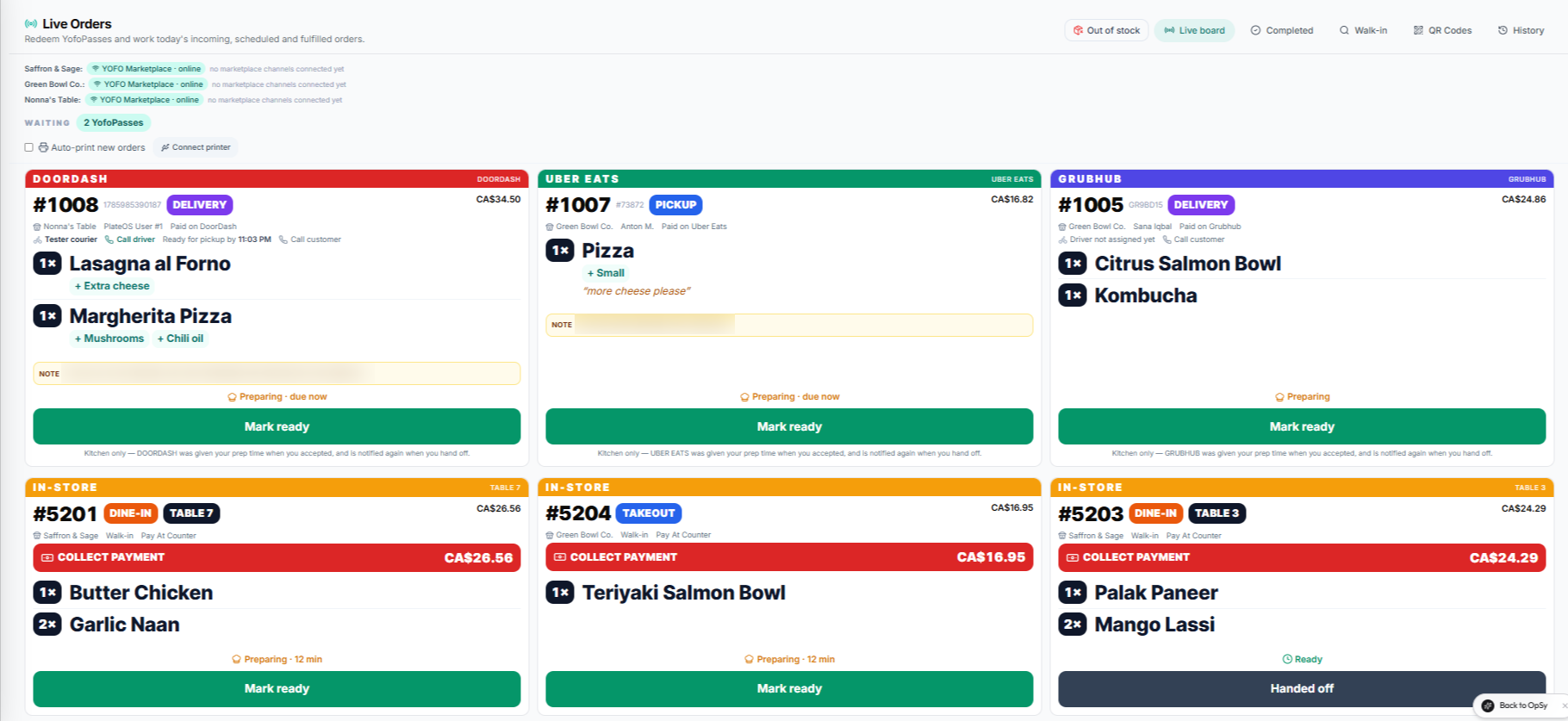
Your regulars may order at the counter one day and online the next. Keep the experience recognisably yours while your team manages the work in PlateOS.
Inside PlateOS: OrderHub order tickets. Cropped product capture with demonstration orders.
HOW IT WORKS
From the request to the work behind it.
01
Make the first order straightforward
Publish your menu through a branded storefront and generate QR codes for the relevant store or table. The catalogue and store settings determine what guests can order and how they can pay. Test the guest journey before putting a code into service.
Connected menu and availability
Browser-based QR ordering
Your own domain and branding
02
Build a workflow for repeat visits
Offer supported prepaid meal passes and use the staff redemption terminal to record redemptions. Add OrderHub if you need connected delivery-app orders on the same operational board. Staff roles and store selection help your team focus on its own responsibilities.
Pass lookup and redemption history
Connected delivery-channel tickets
Store-aware staff workflows
BEFORE YOU START
A few useful answers.
Is OrderHub mandatory?
No. It is an optional paid module. Direct storefront and QR workflows do not require connecting a delivery app.
 PlateOS